The Journey of a URL: What Happens When You Hit Enter the URL in browser?

When you type a URL into your browser and hit Enter, a complex chain of events is triggered to transform a line of text into a functional website. Here are the complete notes on that process, broken down into five logical phases.
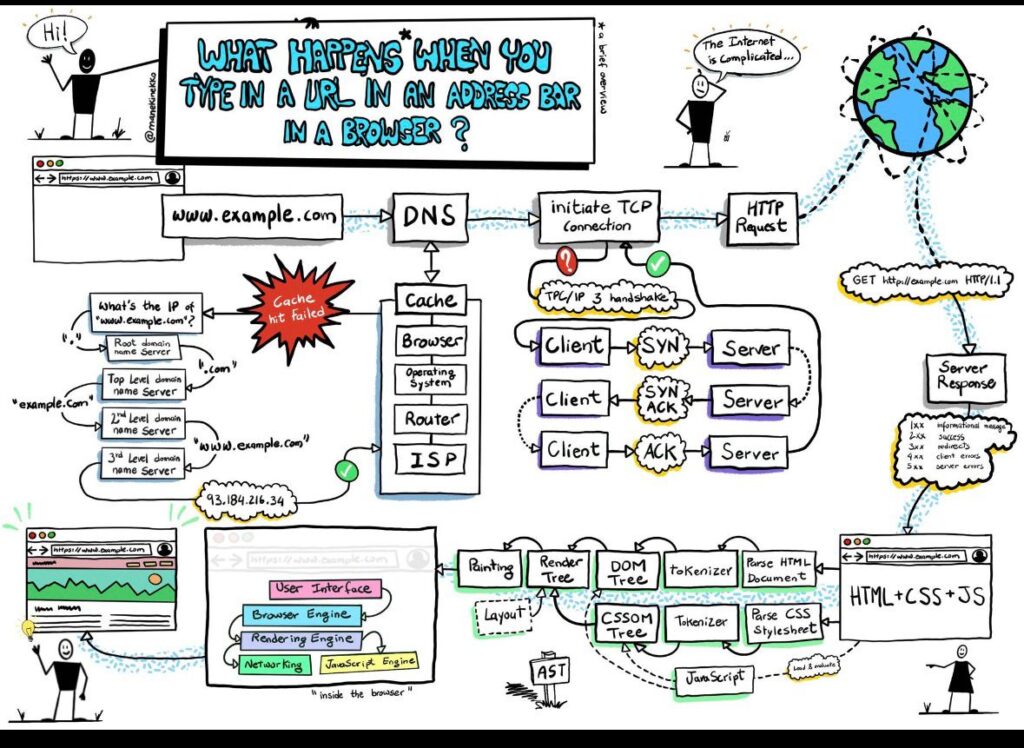
Phase 1: The DNS Lookup (Finding the Address)
Before the browser can connect to a server, it needs to translate the human-readable URL (e.g., www.example.com) into a machine-readable IP address (e.g., 93.184.216.34).
- Browser Cache: The browser checks its own internal “phonebook” to see if you’ve visited this site recently.
- OS & Router Cache: If not found, it asks your computer’s Operating System, then your router.
- ISP (Recursive) Resolver: If still unknown, the request goes to your Internet Service Provider.
- The DNS Hierarchy: If the ISP doesn’t have it, it queries the Root Nameservers, which point to the Top-Level Domain (TLD) server (like
.com), which finally points to the Authoritative Nameserver that holds the actual IP.
Phase 2: The TCP/IP Handshake (Connecting)
Once the IP address is known, the browser must establish a connection to the server. Most websites use HTTPS, which requires a reliable connection.
- SYN (Synchronize): The client sends a packet to the server asking to connect.
- SYN-ACK (Acknowledgment): The server replies, confirming it is open for business.
- ACK: The client sends a final confirmation.
- TLS Handshake: For secure (HTTPS) sites, an additional “handshake” occurs here to exchange encryption keys, ensuring no one can eavesdrop on your data.
Phase 3: The HTTP Request
Now that the “pipe” is open, the browser sends an HTTP Request. This is a text-based message that tells the server exactly what the user wants.
- Method: Usually a
GETrequest (asking for data). - Headers: Includes info like what browser you are using (User-Agent) and what types of files you can accept.
- URL Path: Telling the server exactly which page or file to send back.
Phase 4: The Server Response
The web server receives the request, finds the content on its hard drive (or generates it using a database), and sends it back.
- Status Codes: The response starts with a code.
200means success,404means not found, and500means the server crashed. - Response Body: This contains the actual HTML code of the website.
Phase 5: Browser Rendering (Building the Page)
This is the “construction” phase where the browser turns raw code into the visual page you see.
- Parsing HTML: The browser reads the HTML and builds the DOM (Document Object Model)—a tree-like structure of all the elements on the page.
- Parsing CSS: It reads the styling rules and builds the CSSOM (CSS Object Model).
- JavaScript Execution: The browser downloads and runs JavaScript, which can change the DOM or add interactivity.
- Render Tree: The DOM and CSSOM are combined to figure out what is actually visible.
- Layout & Painting:
- Layout: Calculating the exact coordinates and size of every box on the screen.
- Painting: Filling in pixels with colors, images, and borders.
Key Summary Table
| Step | Primary Protocol | Goal |
| Lookup | DNS | Convert Name $\rightarrow$ IP Address |
| Connect | TCP/TLS | Establish a secure “conversation” |
| Request | HTTP | Ask for the specific webpage files |
| Render | HTML/CSS/JS | Turn code into a visible, interactive UI |
Would you like me to expand on any specific part of this, such as the security certificates (SSL/TLS) or how JavaScript engines like V8 work?
